
How to Remove Background Noise Audio? (2026 Guide)
Recordings from long meetings or interviews shouldn't lose their value because of distracting background noise.
However, this is a common problem in many recordings. Sounds like air conditioners, keyboard typing, room echo, and even microphone noise can affect voice clarity.
In the past, fixing these issues often required professional audio software, where users had to manually adjust noise reduction settings and edit audio tracks. But different types of noise require different approaches, and achieving a natural-sounding result is not always easy.
So, how can you remove background noise more efficiently while keeping voices clear and natural? In this guide, we'll cover common noise reduction methods and how AI voice cleaner can make audio cleanup easier.
What Are the Common Types of Background Noise in Audio Recordings?
Background noise in audio recordings can usually be divided into several categories. The type of noise often depends on the recording environment, and understanding these common issues can help you choose a more suitable way to handle them.
Continuous Background Noise
Continuous background noise refers to sounds that remain present throughout the recording, such as air conditioners, fans, computer noise, or other electronic devices.
These sounds are usually stable and do not suddenly appear, but they can reduce the overall cleanliness of the recording. They often become more noticeable when the volume of the voice is increased during editing.
Environmental Noise
Environmental noise mainly comes from the surroundings where the recording takes place, such as conversations in an office, traffic sounds, or people nearby.
This type of noise is common in meetings, interviews, and outdoor recordings. Since the source of the noise can change constantly, it often requires more targeted processing.
Room Echo and Equipment Noise
The recording environment and equipment itself can also affect audio quality. Empty rooms can create echo and reverberation, while microphone quality, cables, or recording devices may introduce background hiss, static, or other unwanted sounds.
These issues can make voices sound less clear and reduce the natural quality of the recording.
Different types of noise require different approaches. In the following sections, we'll explore both traditional noise reduction methods and AI-powered tool, so you can choose the option that best fits your needs and recording situation.
Traditional Way to Remove Background Noise from Audio
Using professional audio software as an example, Adobe Audition provides a common workflow for removing background noise. The process usually includes the following steps:
Step1: Import the Audio File and Find the Noise
First, import the audio file into Adobe Audition and listen through the entire recording to identify the main sources of background noise.
If there is a section that contains only background noise without any voice, you can use that part as a reference for the noise reduction process. For example, continuous sounds like air conditioners, fans, or equipment noise can be analyzed this way.
Step2: Capture the Noise Sample and Apply Noise Reduction
After selecting a section that contains only background noise, you can use Adobe Audition's noise reduction feature to capture the noise profile.
The software will then analyze the noise characteristics and apply the reduction effect across the recording to lower similar background sounds. You can adjust settings such as noise reduction amount and intensity to keep the processed audio sounding natural.
Step3: Adjust the Settings and Check the Final Result
After applying noise reduction, it is important to listen to the result carefully. If the reduction level is set too high, it may affect the original voice details and make the audio sound unnatural.
In practice, you usually need to fine-tune the settings based on the recording and find the right balance between reducing background noise and keeping the original sound quality.
Limitations of Traditional Noise Reduction Methods
Professional audio software can provide more precise control, but there are still some limitations in practice, especially for users who are new to audio editing.
- Requires a learning curve: Professional software like Adobe Audition usually comes with a wide range of audio tools and settings. For users who have never worked with audio editing before, it can take time to learn how to use them.
- Different noises require different approaches: Not every type of noise can be fixed with the same settings. Different noise sources often require more targeted adjustments.
- Time-consuming for long recordings: For long audio files that last several hours, manually analyzing and processing the recording can take a lot of time, and it often requires multiple rounds of listening and adjustments, making the process less efficient.
A Smart Way to Remove Background Noise from Audio with AI
For users who are not familiar with professional audio software, AI can be a good alternative. It is simple, efficient, and does not require any audio editing experience.
You can choose any AI noise reduction tool that fits your needs. In this article, we will use Audio Transcriber AI as an example. The tool is completely free with no usage limits, making it a practical option for users who only need to clean up audio occasionally.
How to Remove Background Noise Using Audio Transcriber AI
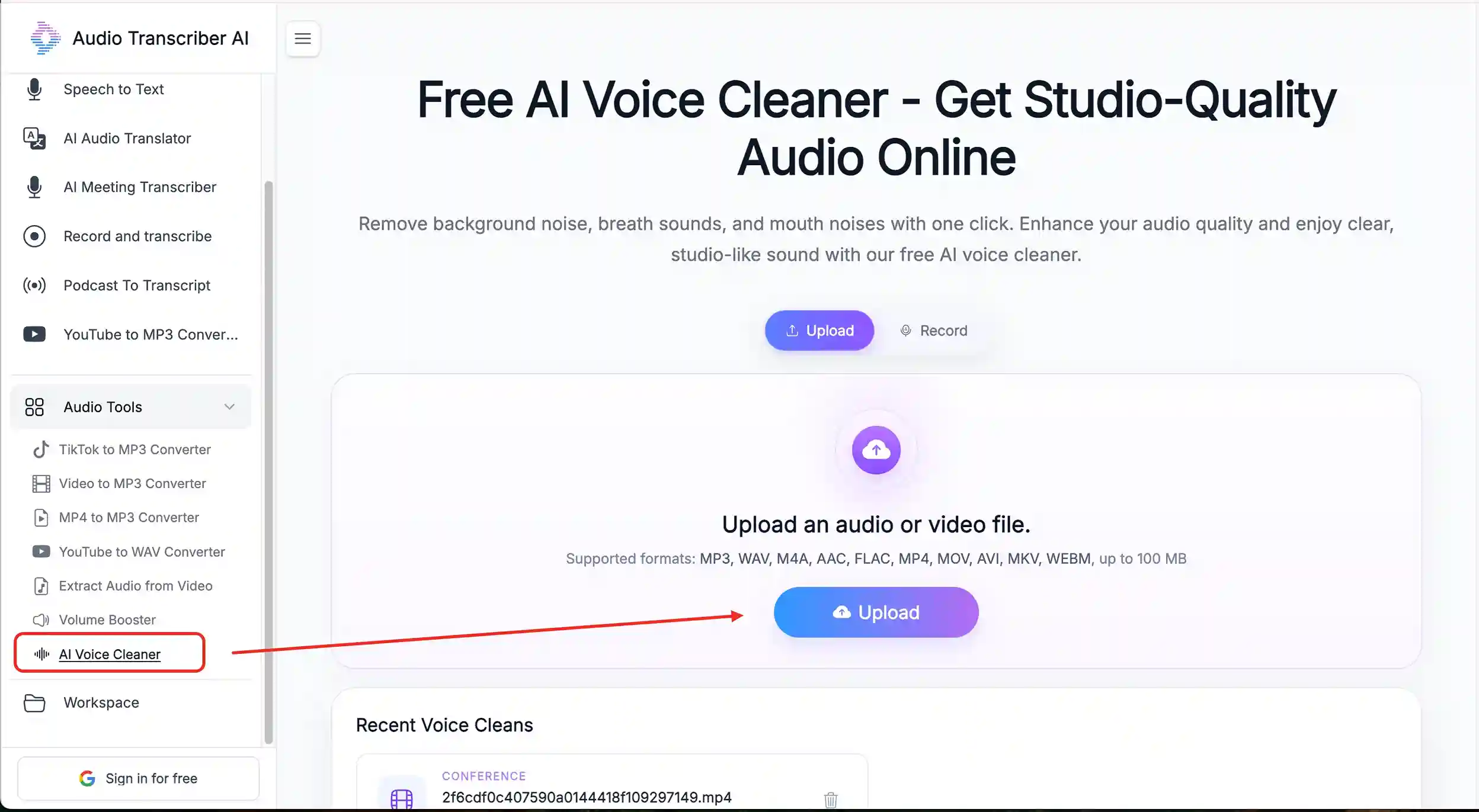
Step 1: Upload your audio or video file
Open the AI Voice Cleaner feature in Audio Transcriber AI and upload the recording you want to clean up.
Step 2: Select the section you want to process
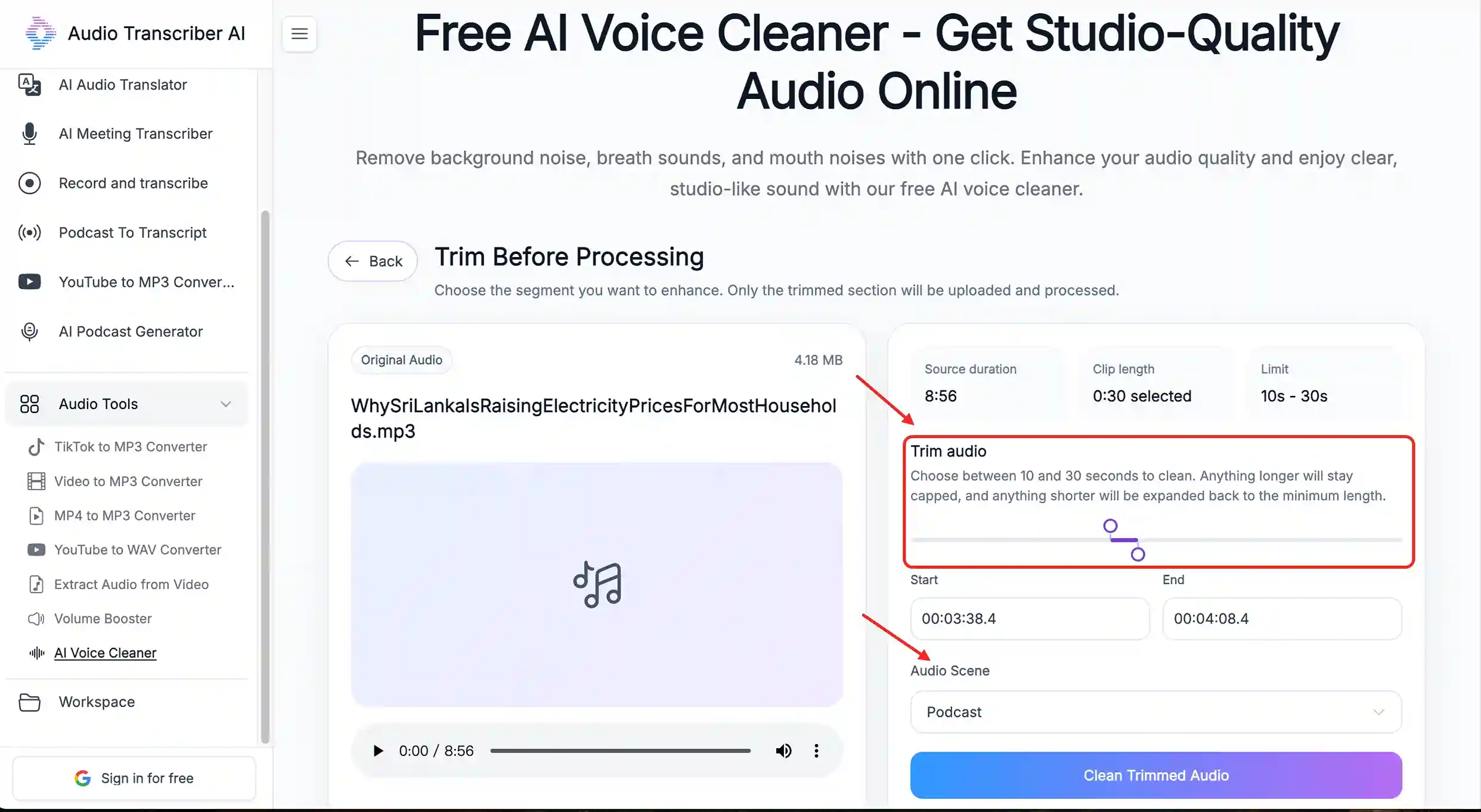
If only a specific part of the recording contains unwanted noise, you can select that section for more targeted noise removal instead of processing the entire file.
Step 3: Choose the recording scenario
Select a scenario that matches your recording, such as Conference, Interview, Meeting, Lecture, Podcast, or Music. Audio Transcriber AI will adjust the noise removal process based on the selected scenario and help reduce common background sounds, such as coughing, air conditioner noise, and other distractions in meeting recordings.
What Recording Scenarios Can AI Voice Cleaner Handle?
With the different scenario modes available in Audio Transcriber AI's AI voice cleaner, you can choose the option that matches your recording type and get noise reduction that better fits your specific needs.
| Mode | Common Noise Issues | Best For |
|---|---|---|
| Conference / Meeting | Air conditioner noise, keyboard typing, background conversations, coughing | Meeting notes, team discussions |
| Interview | Traffic noise, surrounding voices, wind noise, microphone background noise | Interviews, on-site conversations |
| Podcast | Room echo, fan noise, recording device noise | Podcasts, online courses |
| Music | Electrical noise, equipment noise, environmental sounds | Music and vocal recordings |
| Mobile Phone | Wind noise, outdoor sounds, phone recording noise | Mobile videos, daily recordings |
Conference
Conference recordings usually contain more than one type of background noise at the same time.
For example, air conditioner sounds, keyboard typing, conversations from other people, or unexpected noises like coughing during the recording can all affect the clarity of the main discussion.
For this type of audio, you can select the 【Conference】 or 【Meeting】 mode in Audio Transcriber AI to better match the common noise conditions found in meeting environments.
Interview
Interview recordings usually focus on the voices of the interviewer and the guest, but the recording environment is not always easy to control.
Whether the interview takes place in an office, outdoors, or in a public space, the audio may pick up unwanted sounds such as traffic noise, nearby conversations, wind, or microphone background noise.
For this type of recording, you can choose the 【Interview】 mode to better handle voice-focused content and make the interview clearer for editing and publishing.
Podcast
Podcast and lecture recordings are usually longer, which makes continuous background noise more noticeable over time.
Sounds like room echo, computer fan noise, and recording device hiss can affect the overall listening experience, especially during long playback.
For this type of content, you can select the 【Podcast】 mode in AI voice cleaner to reduce these environmental distractions and make the audio sound cleaner.
Conclusion
Removing background noise is an important part of improving audio quality. Since different recording environments come with different noise issues, choosing the right approach can help reduce unwanted sounds while keeping the original voice natural.
Professional audio software offers more detailed control, but it can also require more editing experience and time for manual adjustments. For users who want a simpler way to clean up recordings, Audio Transcriber AI's free AI voice cleaner provides a more convenient option.
By selecting the right recording scenario and uploading your audio or video file, you can reduce common background noise and make your content clearer without spending a lot of time on complicated audio editing.